

Why Trusted Vector Art Services Matter for Printing
Learn why trusted vector art services are important for professional printing, from scalable artwork and clean paths to color accuracy and print quality.
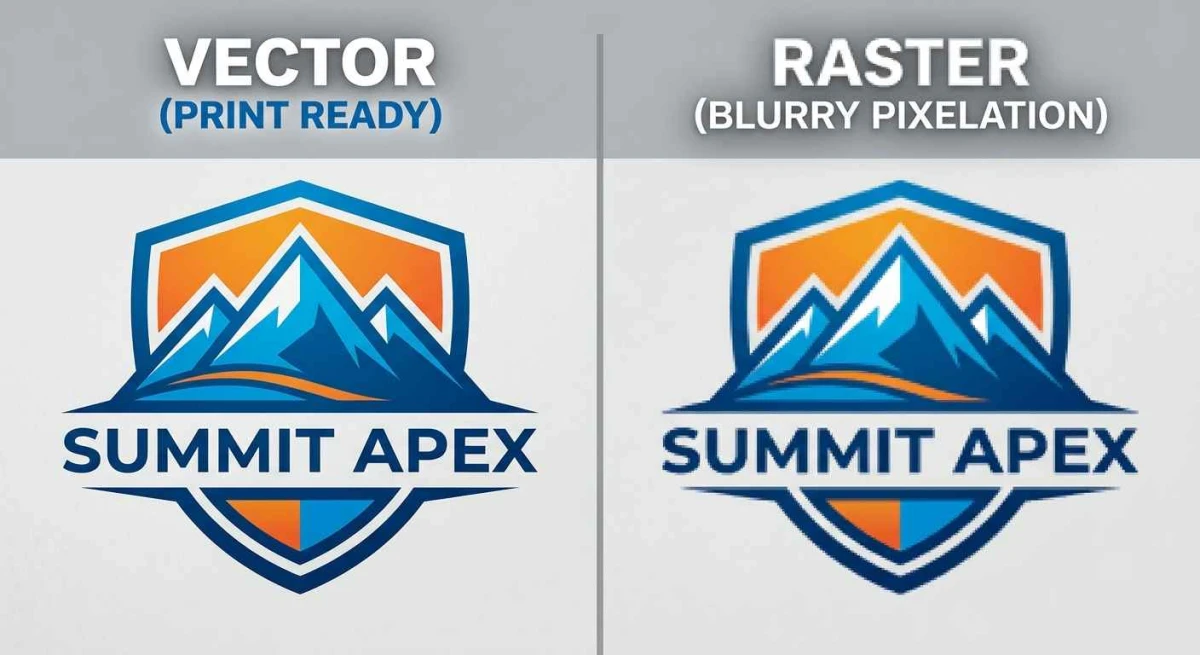
Professional printing requires artwork that can maintain its quality across different sizes, materials, and production methods. A logo that looks sharp on a computer screen may produce blurry edges, uneven shapes, or poor detail when enlarged for a banner, sign, packaging, or large-format print. trusted vector art services help prepare artwork as scalable vector graphics with clean paths, controlled shapes, and production-ready details.
Vector artwork is built using mathematical paths rather than fixed pixels. This allows the same design to be resized without the loss of sharpness normally associated with raster images. However, simply converting a raster image into a vector format does not guarantee professional results. The paths, curves, colors, typography, and fine details must be carefully constructed and reviewed for the intended printing process.
Understanding how vector artwork supports professional printing can help businesses, designers, marketers, and print buyers make better decisions when preparing files.
What Is Vector Artwork?
Vector artwork is created from mathematical paths that define lines, curves, shapes, and other design elements. Unlike raster images, which are made from individual pixels, vector graphics can generally be scaled to different dimensions without becoming pixelated.
Common vector file formats include AI, EPS, SVG, and PDF, although the exact format required depends on the printing workflow.
Vector graphics are widely used for logos, icons, illustrations, packaging artwork, signage, labels, promotional materials, and other designs that may need to be reproduced at multiple sizes.
The flexibility of vector artwork makes it particularly useful when print quality and scalability are important.
Why Vector Quality Matters in Professional Printing
Printing exposes artwork problems that may not be obvious on a monitor. Enlarging a low-resolution raster image can reveal jagged edges and blurry details. Poorly constructed vector artwork can also create problems, including overlapping paths, open shapes, incorrect colors, and inconsistent curves.
Professional vector preparation addresses these issues before the artwork reaches production.
A properly prepared file can provide cleaner edges, predictable shapes, and greater flexibility for different print sizes. It can also make the file easier for printers and designers to work with.
Vector Graphics Preserve Sharp Edges
One of the main advantages of vector artwork is its ability to maintain clean edges when resized.
Consider a company logo used on a business card and then reproduced on a large outdoor sign. A small raster file may contain enough pixels for the business card but become visibly blurry when enlarged.
A properly constructed vector version can be scaled to a much larger size while maintaining smooth curves and defined edges.
This is especially useful for branding because companies often need to use the same logo across many printed products.
Vector Artwork Supports Different Print Sizes
Professional printing often requires the same artwork in multiple dimensions.
A logo may appear on stationery, brochures, product packaging, banners, vehicle graphics, labels, and promotional materials. Each application may require different dimensions.
Vector artwork allows designers to resize the design without recreating it from scratch for every application.
However, scaling should still be reviewed carefully. Some layouts, text elements, and fine details may need adjustments when a design is adapted for significantly different applications.
The Role of Clean Paths
Vector artwork is made from paths that define shapes and curves. Poorly constructed paths can create visible irregularities or make the file difficult to edit.
Clean paths provide smoother curves and more predictable shapes. They can also reduce unnecessary anchor points that may complicate the design.
Professional vector preparation typically involves reviewing curves, removing redundant points, correcting shapes, and ensuring that important elements are constructed accurately.
This is particularly important for logos and other graphics where precise geometry affects the appearance of the final print.
Why Manual Vector Conversion Can Be Important
Automated tracing tools can convert raster artwork into vector paths quickly, but the resulting file may contain unnecessary points, rough curves, or incorrectly interpreted shapes.
For simple artwork, automated tools may provide a useful starting point. Complex logos and detailed illustrations often benefit from manual refinement.
A professional vector specialist can evaluate the original artwork and rebuild or correct paths where automatic tracing produces undesirable results.
The objective is not merely to create a vector file extension. The goal is to produce artwork that is structurally useful for design and printing.
Color Accuracy in Print Artwork
Color can change between digital screens and printed materials. Different printing methods, substrates, inks, and color profiles can affect the final appearance.
Vector artwork gives designers greater control over individual color elements, but the file still needs to be prepared according to the requirements of the printing process.
Depending on the project, a printer may request CMYK colors, spot colors, Pantone references, or another specification.
A trusted vector service should understand that color preparation is part of production readiness rather than treating it as a simple visual selection.
CMYK and RGB Considerations
RGB is primarily associated with digital displays, while CMYK is commonly used for many commercial printing processes.
A design created exclusively for a screen may use RGB colors that cannot be reproduced exactly with standard CMYK printing.
Before finalizing artwork, the intended output should be considered. A professional vector file can be prepared with the appropriate color information based on the printer's specifications.
This helps reduce unexpected color differences between the approved digital artwork and the printed result.
Typography and Editable Text
Typography can create additional challenges in print production.
Fonts may not be available on another computer, or a printing system may interpret them differently. For certain workflows, text may need to be converted to outlines so the appearance remains consistent.
However, converting text to outlines also means it is no longer directly editable as text.
The appropriate approach depends on the production workflow. Keeping an editable source file alongside a print-ready version can be useful for future revisions.
Vector Artwork for Logos and Branding
Businesses frequently need logos in different sizes and formats. A logo that works for a website may also need to appear on printed brochures, signs, packaging, uniforms, and promotional products.
A properly prepared vector master file gives designers greater flexibility when adapting the logo for these applications.
It also makes it easier to maintain consistent proportions, colors, spacing, and typography across different materials.
For businesses that rely heavily on branding, maintaining an accurate vector master can save time during future design and print projects.
Preparing Artwork for Large-Format Printing
Large-format printing places greater demands on artwork because designs may be reproduced at very large dimensions.
Banners, signs, vehicle graphics, wall graphics, and displays can expose weaknesses in low-resolution artwork.
Vector graphics are particularly suitable for many large-format applications because paths can be scaled without the pixelation associated with raster images.
Even with vector artwork, the final file should be reviewed according to the printer's requirements, including dimensions, color settings, bleed, fonts, and any required effects.
Bleed, Trim, and Print Layout
Professional printing often requires more than clean artwork. The document itself may need to include bleed and trim information.
Bleed allows background colors or graphics to extend beyond the final trim area, reducing the chance of unwanted white edges after cutting.
The exact bleed requirement varies by printer and product. A trusted vector service should follow the specifications supplied by the print provider rather than applying a universal measurement to every project.
Proper layout preparation can help prevent production delays and unnecessary revisions.
Vector Artwork for Packaging
Packaging artwork often combines logos, text, illustrations, product information, barcodes, and regulatory details.
Because packaging can involve different dimensions and printing processes, accurate vector construction is particularly important.
Cut lines, folds, panels, and print areas need to be positioned correctly according to the packaging template.
A small path or alignment error can become more noticeable when the artwork is printed, cut, folded, and assembled.
Vector Art for Signs and Promotional Materials
Signs and promotional graphics are often viewed from different distances and may need to remain readable at large sizes.
Vector artwork allows designers to create sharp lettering, logos, icons, and illustrations that can be adapted to different dimensions.
For outdoor applications, other production factors also matter, such as substrate, ink, finishing, and viewing distance.
The vector file is only one part of the printing process, but a properly prepared file provides a reliable foundation.
How Trusted Vector Art Services Improve File Compatibility
Printers and designers may use different software and workflows. A file that works correctly in one environment may require adjustments in another.
Professional vector preparation can include checking layers, paths, fonts, color modes, transparency, and effects.
The final file should be supplied in the format requested by the print provider.
Common delivery formats can include AI, EPS, SVG, and PDF. The best format depends on how the artwork will be used.
Common Problems With Poor Vector Artwork
Poor vector files can create production issues even when the design appears acceptable on screen.
Excessive Anchor Points
Automatic tracing may create hundreds or thousands of unnecessary points. This can make curves difficult to edit and increase file complexity.
Rough Curves
Incorrectly placed anchor points can produce uneven curves or visible bumps along shapes.
Open Paths
Some designs may contain paths that appear closed visually but are technically open. This can affect fills, cutting, or other production processes.
Unwanted Overlaps
Unnecessary overlapping shapes can create unexpected results during printing, cutting, or color separation.
Incorrect Colors
Using inappropriate color modes or inconsistent color values can cause differences between digital artwork and printed output.
Low-Resolution Embedded Images
A vector file can still contain raster images. If those images have insufficient resolution, they may remain blurry even though the surrounding artwork is vector-based.
How to Check a Vector File Before Printing
Before sending artwork to a printer, review the file at a high zoom level. Look for uneven curves, accidental gaps, unwanted overlaps, missing elements, and incorrect proportions.
Check the document dimensions and confirm that the artwork matches the intended print size.
Review color settings and verify whether the printer requires CMYK, spot colors, or another specification.
Fonts should also be checked. If the printer requires outlined text, confirm that the final production copy meets that requirement while keeping an editable version separately.
Choosing a Trusted Vector Art Service
The right provider should have experience with the type of artwork and printing application you need.
Instead of evaluating a service solely by price, review examples of completed vector artwork. Look closely at curves, lettering, fine details, and the cleanliness of the paths.
Ask about supported file formats, turnaround times, revision policies, and whether the artwork is manually refined when automatic conversion does not produce suitable results.
It is also useful to explain how the artwork will be printed. A logo intended for screen printing may have different requirements from artwork prepared for large-format digital printing, packaging, or signage.
Questions to Ask Before Ordering Vector Artwork
Before starting a project, provide the original artwork and explain the intended output.
Useful information includes:
- Final print size
- Printing method
- Required file format
- Color requirements
- Bleed specifications
- Whether text must remain editable
- Intended material or substrate
Clear project specifications reduce uncertainty and help the vector specialist prepare artwork that matches the actual production workflow.
How Vector Artwork Supports Long-Term Branding
A properly prepared vector master file can become a useful business asset.
Companies often reuse their logos and graphics for years across different marketing materials. Having a clean master file means designers do not have to repeatedly recreate the artwork from low-resolution images.
The same master can be adapted for brochures, signs, packaging, advertisements, labels, and other applications.
Maintaining organized source files also makes future brand updates easier.
Vector Art and Print Production Efficiency
Production problems can become expensive when they are discovered after a project has already entered printing.
Incorrect dimensions, missing fonts, unsuitable colors, poor paths, and low-resolution embedded elements may require revisions and additional proofing.
Preparing artwork correctly before submission can reduce these avoidable issues.
A trusted vector service can review the artwork with production requirements in mind, helping identify technical concerns before the printer begins the job.
Why Professional Review Still Matters
Software can identify certain technical issues, but automated checks cannot always determine whether a logo's curves look visually correct or whether a complex shape accurately represents the original artwork.
Human review remains useful for evaluating design accuracy, proportions, typography, path quality, and visual consistency.
The strongest workflow often combines appropriate software with experienced manual inspection.
Conclusion
Professional printing depends on properly prepared artwork, and vector graphics provide an effective foundation for many print applications. Clean paths, scalable shapes, appropriate colors, accurate typography, and production-ready file settings can help reduce common problems before artwork reaches the printer.
Choosing trusted vector art services is useful when artwork requires manual refinement, accurate path construction, color preparation, or adaptation for different printing applications. A professional approach also considers the printer's specifications rather than treating every vector file as identical.
For businesses and designers, maintaining a clean vector master file can simplify future projects and help preserve brand consistency across different printed materials. idigitize can be considered when comparing professional vector artwork and conversion providers.
Frequently Asked Questions
Q1. What are trusted vector art services?
They are professional services that create, convert, or refine vector artwork for specific design and production requirements. Their work may include manual path creation, raster-to-vector conversion, color preparation, typography adjustments, and file cleanup.
Q2. Why are vector files better for professional printing?
Vector graphics can generally be resized without the pixelation associated with raster images. This makes them useful for applications ranging from small printed materials to large-format graphics.
Q3. Can a JPG be converted into a professional vector file?
Yes. A JPG or other raster image can be manually or automatically converted into vector paths. However, complex artwork often requires manual refinement after tracing.
Q4. Which vector file format is best for printing?
There is no single format that is best for every printing workflow. AI, EPS, SVG, and PDF are commonly used, but the correct choice depends on the printer and production method.
Q5. Does vector artwork guarantee perfect print quality?
No. Vector artwork provides scalable graphics, but print quality also depends on color management, printer settings, substrate, resolution of embedded raster elements, finishing, and the printing process.
Q6. Should text be converted to outlines?
It depends on the printer's requirements. Outlining can help preserve the appearance of fonts when the file is opened on another system, but it removes direct text editing.
Q7. Can vector artwork contain raster images?
Yes. A vector document can contain embedded or linked raster elements. Those elements still need adequate resolution for the intended print size.
Q8. Why should I tell the vector service how the artwork will be printed?
Different printing methods have different technical requirements. Knowing the intended application allows the artwork to be prepared according to the relevant dimensions, colors, bleed, and production specifications.
What's Your Reaction?
 Like
0
Like
0
 Dislike
0
Dislike
0
 Love
0
Love
0
 Funny
0
Funny
0
 Wow
0
Wow
0
 Sad
0
Sad
0
 Angry
0
Angry
0














Comments (0)